MCP / API Access
EdgeMCP / API Access gives you a personal MCP server endpoint and API keys so you can pipe your Flux data into AI agents, BI tools, and custom automations — without copying anything out of the dashboard.
How it works
Flux has two separate integrations, each with its own credentials. You can revoke either at any time.
MCP (AI clients)
Connect an AI client to https://www.fluxgraph.app/mcp and it can call Flux tools conversationally, with no copy-paste and no screen-scraping.
- Claude (web, desktop, mobile) connects by signing in with your Flux account. No key is involved.
- Claude Code, Cursor, Zed, and other MCP clients connect with an MCP key from Settings → MCP → Developer setups, which also shows a ready-to-paste snippet for each client.
See Connecting Claude and other AI clients for step-by-step setup.
Data API (BI tools and automations)
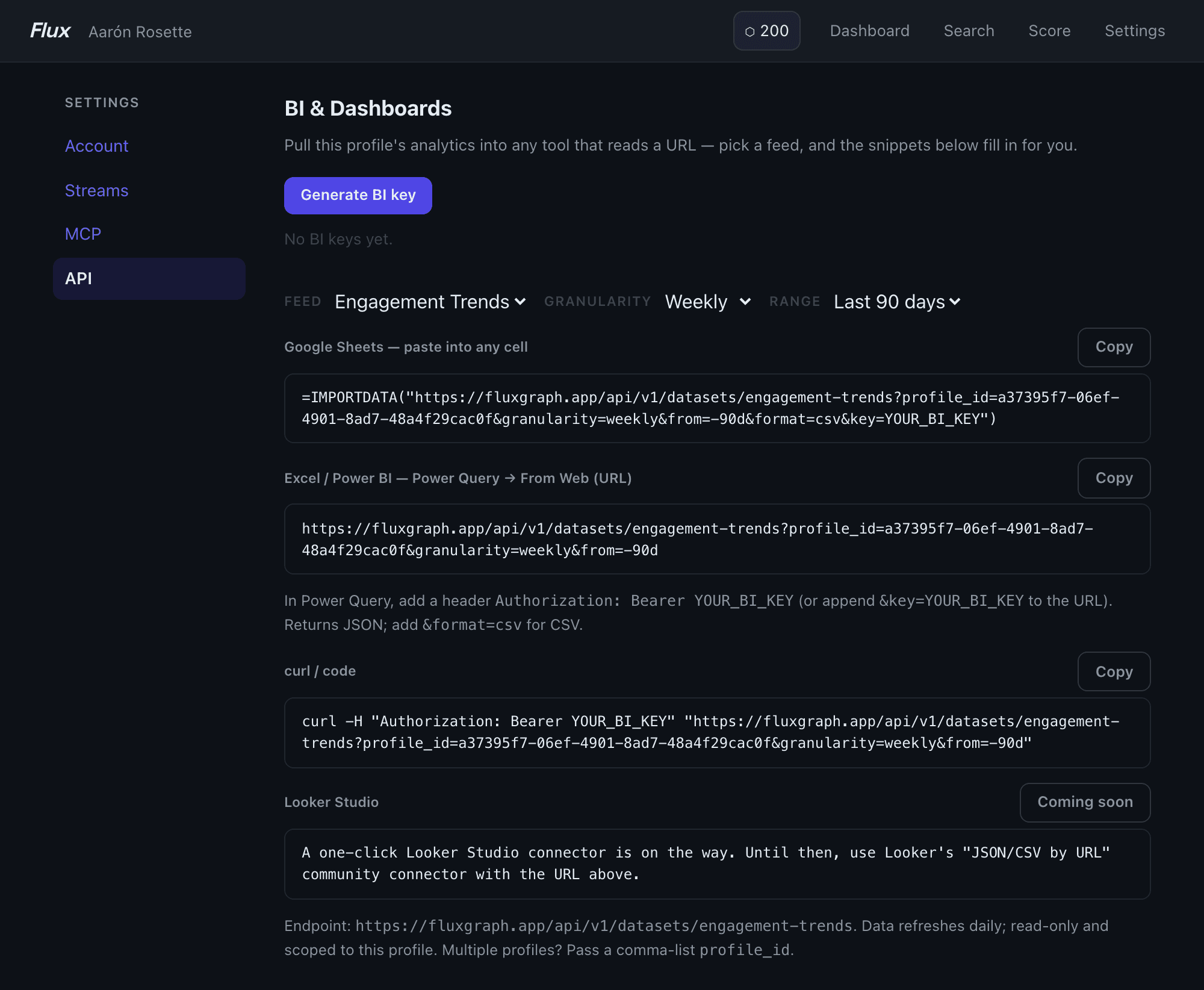
Pull analytics feeds into Google Sheets, Excel / Power BI, Clay, Zapier, n8n, or any tool that reads a URL, using a read-only BI key from Settings → API. The settings page shows a live-generated IMPORTDATA formula for Sheets, a Power Query URL for Excel/Power BI, and a curl snippet. Pick a feed (e.g. Engagement Trends, Posting Insights), set the date range, and the snippets update automatically. See Data API.
MCP tools
The MCP server exposes the full Flux toolset to your agent:
- Profile & posts —
get_profile_summary,get_posts,get_posting_insights,get_engagement_trends,get_topic_insights - Prospect research —
get_engagement_brief,get_target_warmth_brief,get_outreach_path,get_outreach_queue,get_profile_summaryon any tracked profile - Engager data —
get_post_engagers_by_company,get_post_set_engagers,get_alumni_engagers,get_company_engagement_overlap - Post scoring —
score_draft,suggest_angles,find_similar_posts,search_posts - Segments & collections —
list_segments,list_collections,add_to_segment,resolve_segment, and more - Streams & campaigns —
list_streams,create_stream,get_stream_feed,get_campaign_stats - LinkedIn live search —
linkedin_people_search,linkedin_company_search,linkedin_post_search,linkedin_profile_info, and related tools (credit-gated)
Key details
- Two key classes: MCP keys (
full) are for developer AI clients; BI keys (bi) are read-only and intended for dashboard tools. Claude sign-in connections don't use a key. - Rate limits are per-user, per-tool, per-hour — set by your plan.
- Data API feeds support
format=csvorformat=json(default) and afromdate parameter (e.g.-30d,-90d,-365d,ytd, or omit for all time). - Multiple profiles: Pass a comma-separated
profile_idlist to the Data API to pull data across profiles you track. - Looker Studio: A one-click connector is coming. For now, use Looker's "JSON/CSV by URL" community connector with your Data API URL.
Tips
- Claude Code: Add Flux with the one-liner in Connecting Claude and other AI clients, then ask Claude to pull an engagement brief or score a draft directly in your terminal.
- Clay / Zapier / n8n: Use the Data API URL as a "fetch from URL" source. Add the header
Authorization: Bearer YOUR_BI_KEYor append&key=YOUR_BI_KEYto the URL if your tool doesn't support custom headers. - Rotate keys freely: Generating a new key invalidates the previous one. Keep separate BI and MCP keys so you can rotate one without breaking the other.
For the full list of MCP tools and their parameters, see the MCP tool reference, or connect the server and ask your client to list Flux's tools. The server returns live schema for every available tool.
Learn more about MCP integration →